





Connect ChatGPT to your accounting
ChatGPT is OpenAI's AI assistant, and you probably already use it. With this connector it draws its answers from your own records in Exact Online, AFAS Profit or Twinfield.
You simply ask your question in plain language and get an answer based on your real figures. If ChatGPT wants to record something, it first asks whether you agree.
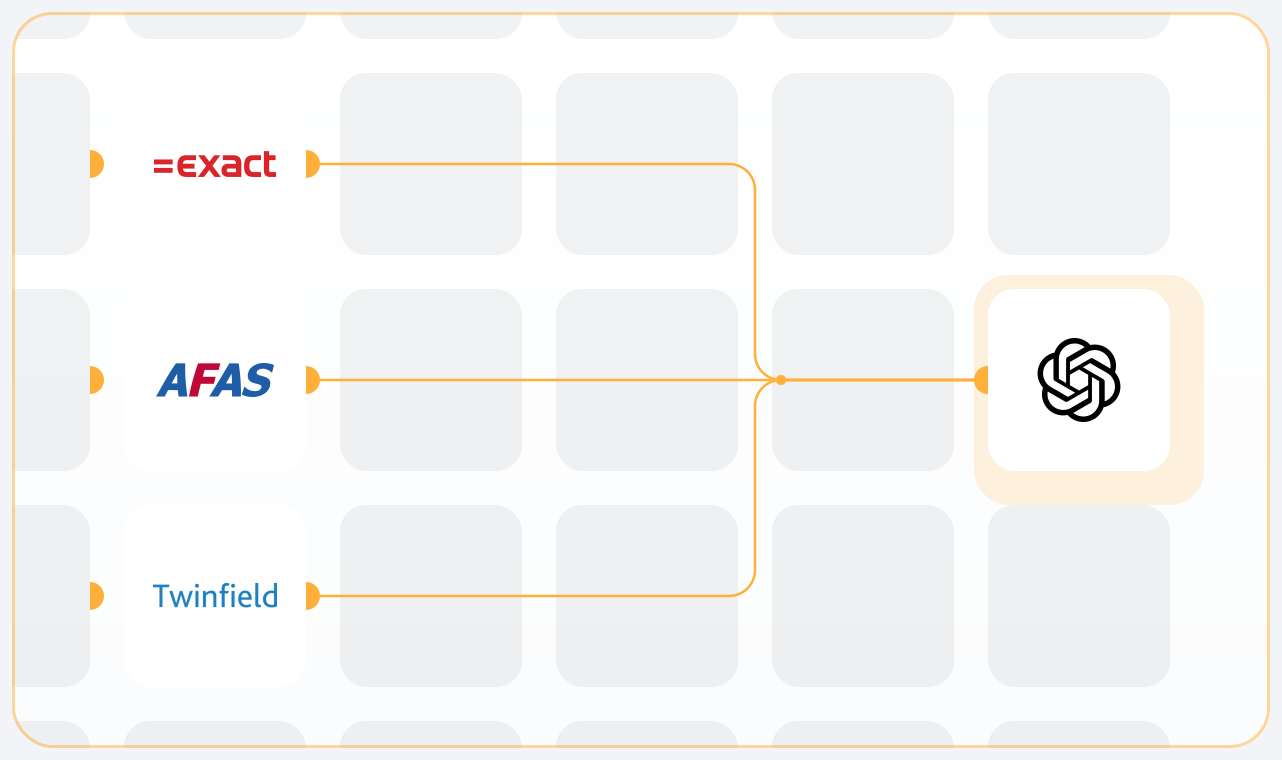
For Exact Online, AFAS Profit and Twinfield
For each of the three packages we have built a dedicated AI Connect connector, and we are a recognised partner of all three. You add the connector for your package to ChatGPT, log in with your own user and then ask your question in plain language. How it works is the same for all three. Which data ChatGPT can retrieve differs per package and per environment.
Exact Online
Besides your financial records, ChatGPT here also reaches your projects and hours, your payroll administration, your production orders and your stock per warehouse. A question such as "which projects have not received any hours this month" is therefore only possible here.
AFAS Profit
The connector runs through connectors, and you decide which ones you switch on. Turn everything on and ChatGPT can reach your entire Profit environment. If you want to limit it to the financial records, you only switch on those connectors.
Twinfield
The financial records, where Twinfield delivers the totals already calculated. A trial balance or your VAT balance is therefore quickly available, without first having to add up separate lines.
What ChatGPT can see in your case depends on your package and on the rights of your user. For each connector, the package page shows exactly what is available.
What you can ask ChatGPT
ChatGPT only retrieves your figures when the connector is switched on in that conversation. Mention it in your question too, so ChatGPT knows for sure that the answer should come from your administration and not from general knowledge.
If you ask about your turnover per customer compared to last year, ChatGPT first works out which data it needs, retrieves it and places the figures side by side. You can see in the conversation when it uses the connector, so you know where the answer comes from.
That makes ChatGPT especially handy for the work you now use an export or pivot table for. For example:
You can keep asking follow-up questions in the same conversation. Start with your turnover per quarter, ask which customer makes the difference and then have ChatGPT write a short explanation for your accountant or management.
If you want ChatGPT to record something, for example a purchase invoice you upload as a PDF, it first shows what it intends to book and only carries it out once you confirm. Nothing goes to your administration without your approval.
Asking questions of your bookkeeping · creating financial analyses
Use cases
What can ChatGPT do for you?
Ask your question the way you would ask a colleague. Choose a topic, copy an example and paste it into a conversation where the connector is switched on.
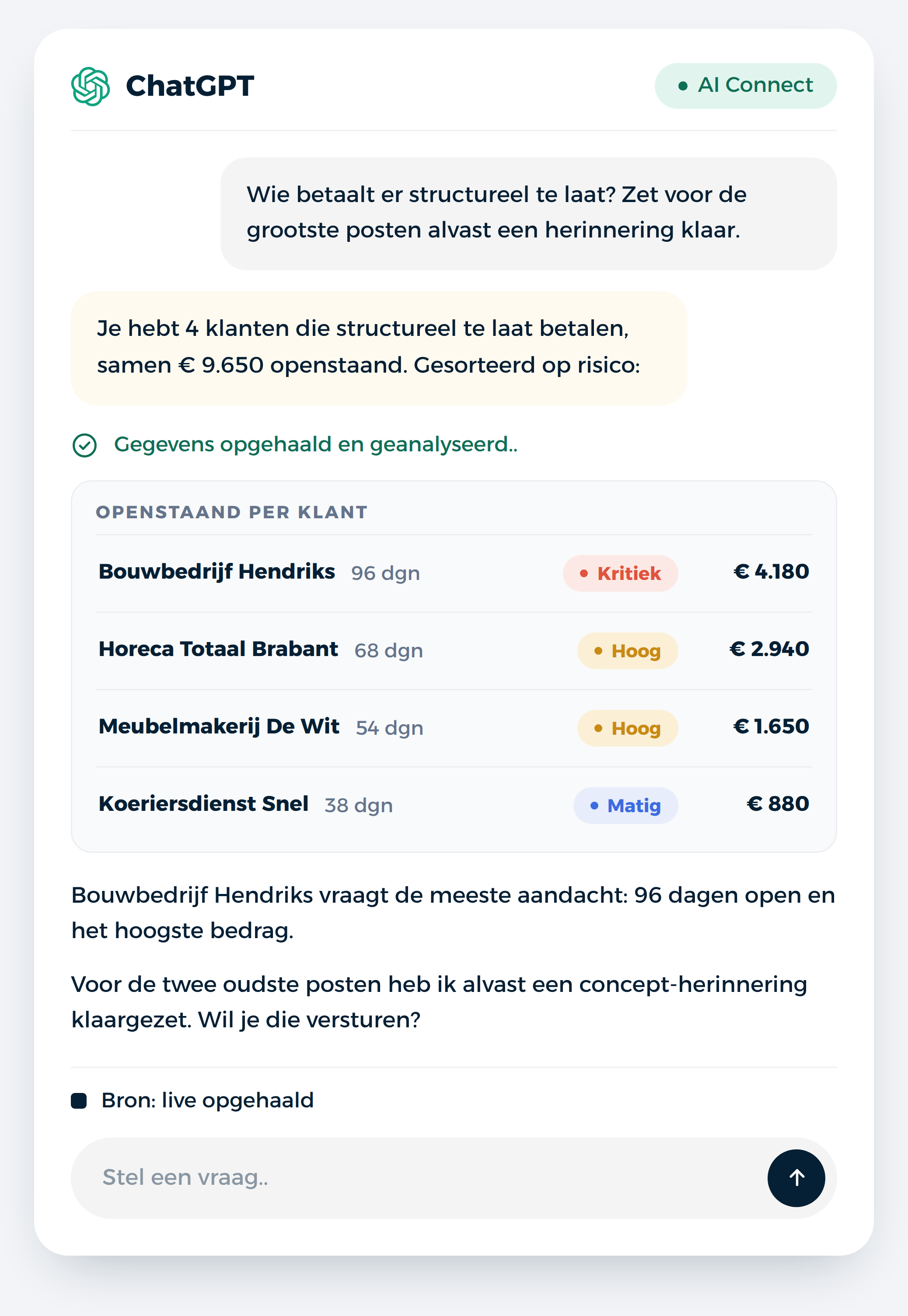
Debtors and payments
6 examples
Give the outstanding amount per customer, from high to low.
A ranking of your outstanding debtors.
Which sales invoices are due this week?
What you can expect in the coming days.
Which customer has the oldest outstanding invoice?
With the amount and the invoice date.
How much is outstanding with customers in Germany and Belgium?
Outstanding items totalled per country.
Which customers have paid nothing for three months?
Customers without payment in that period.
Draw up a payment reminder for this customer.
You see the text first and confirm it yourself.
VAT and returns
6 examples
How much VAT do I have to pay this quarter?
VAT payable minus input tax.
How much input tax has been booked this quarter, per month?
Three months side by side.
Which sales invoices have reverse-charged VAT?
Invoices with a reverse charge code.
Which Dutch suppliers invoiced without VAT?
Purchase invoices with 0% from domestic suppliers.
Which VAT codes do we use most this year?
With the amount per code.
Explain how my VAT balance is built up.
Per category, in plain language.
Turnover and customers
6 examples
Which month was my strongest this year?
With the customers that made the difference.
How many customers bought for the first time this year?
New customers, with their revenue.
What is the average invoice value this quarter?
Compared with the previous quarter.
Give me my turnover per quarter over the past two years.
Eight quarters in a row.
Which customers buy from us every month?
Your regular customers.
Look up this customer's details.
Address, contact person and payment term.
Costs and purchasing
6 examples
What were my biggest cost items last quarter?
The invoices with the highest amounts.
Which suppliers are new this year?
Suppliers without invoices before this year.
How much are we spending on software and subscriptions this year?
Totalled across the related accounts.
What is still outstanding with this supplier?
Outstanding purchase invoices with due date.
Book this purchase invoice to the related general ledger account.
ChatGPT proposes the booking, you confirm.
Create a new customer relationship with these details.
Details you paste into the conversation.
Monthly checks
6 examples
Are there any purchase invoices that appear to be booked twice?
Same supplier, amount and date.
Give a trial balance as at the end of last month.
Balances per general ledger account.
Which general ledger accounts have an unusual balance?
Accounts that deviate from their normal side.
What explains the difference in result compared to last year?
The entries that moved the most.
Which cost centres are over budget?
Actuals alongside budget.
What is still left on the suspense accounts?
Entries that still need an allocation.
Projects, stock and production
6 examples
Which projects received no hours this month?
Projects nobody logged time on.
How many billable hours were logged this quarter per project?
Totalled per project.
How much stock do I have of this item, per warehouse?
The level per location.
Which items have a negative stock?
Items that need correcting.
Which items do we sell most often?
By number of sales order lines.
Which production orders were reported as finished this week?
With quantities per order.
What is MCP, and how does it work in ChatGPT?
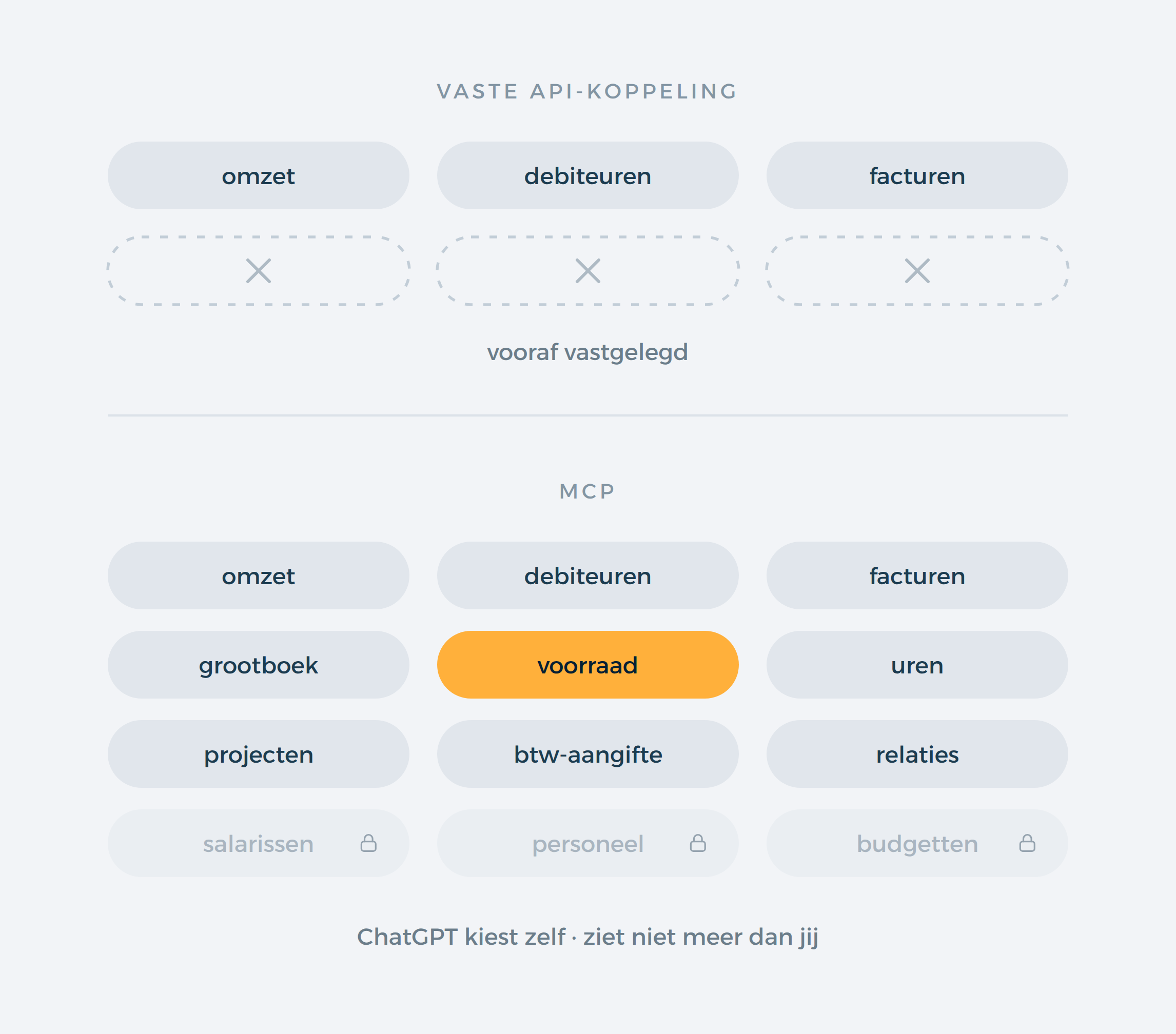
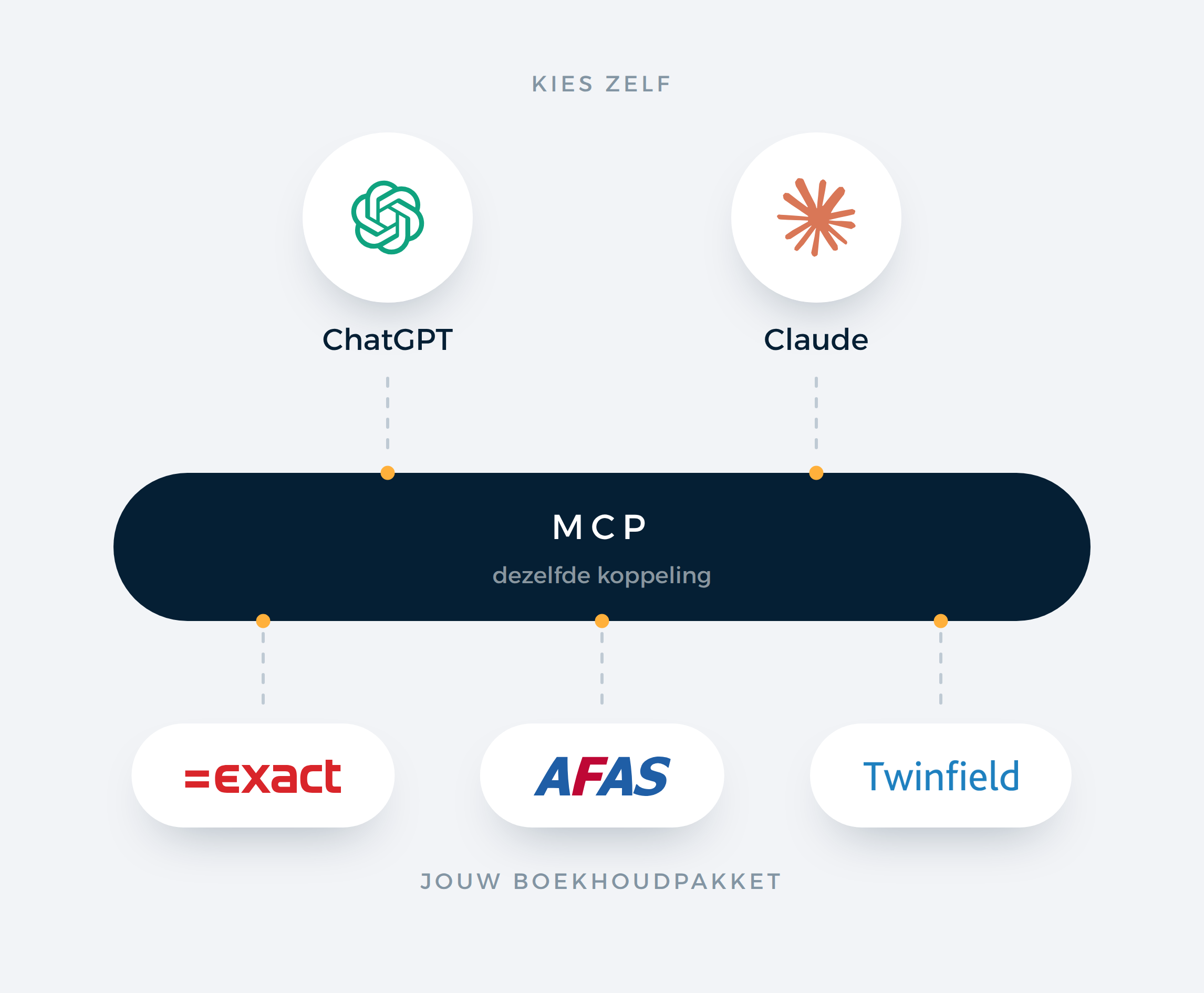
MCP, short for Model Context Protocol, is an open standard that lets an AI assistant connect to other software. Anthropic came up with it and OpenAI built it into ChatGPT. For you this means you install nothing on your computer and no programming is involved.
The difference with a fixed API connector is this. With an API connector a developer decides in advance which data is exchanged, and if you want to know something else, the connector has to be reworked. With MCP, ChatGPT gets an overview of the actions it is allowed to perform and chooses itself which ones it needs for your question. That way you can also ask questions nobody thought of beforehand.
Access runs through your accounting package itself. With Exact Online and Twinfield you log in once with your own user and give permission, just like with a webshop connector. ChatGPT then works with your user rights and sees nothing you have no access to. With AFAS Profit you set the access with the connectors you open up for the connector.
How the connector works: Exact Online · AFAS Profit · Twinfield
How to connect ChatGPT to your administration
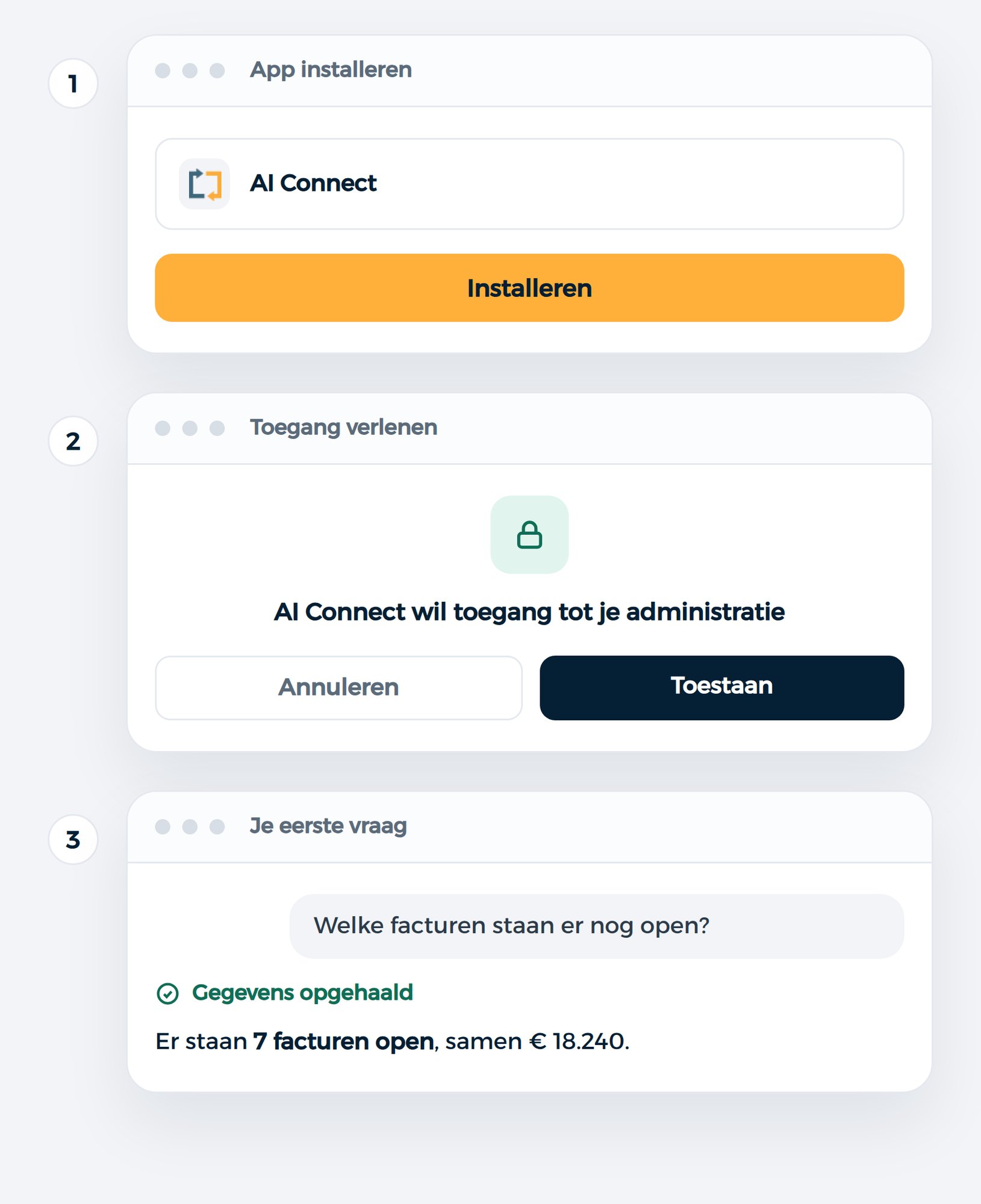
Connecting takes three steps and a few minutes. It works with any ChatGPT account, including the free one.
1. Open plugins
Go to chatgpt.com/plugins, click Add in the top right and choose Add custom MCP server. If you don't see that option in a business account, ask your administrator to allow adding your own connectors. Your administrator can also set up the connector straight away for the whole team.
2. Add the connector
Paste the connector link of your accounting package into Server URL, click Create as a plugin and grant permission with your own user. You only have to do this once, and you can revoke access later in your accounting package itself.
3. Your first question
Open a new conversation, switch on the connector via the plus menu and ask your question. If you start a new conversation later, switch it on again there.
Step by step: Exact Online · AFAS Profit · Twinfield
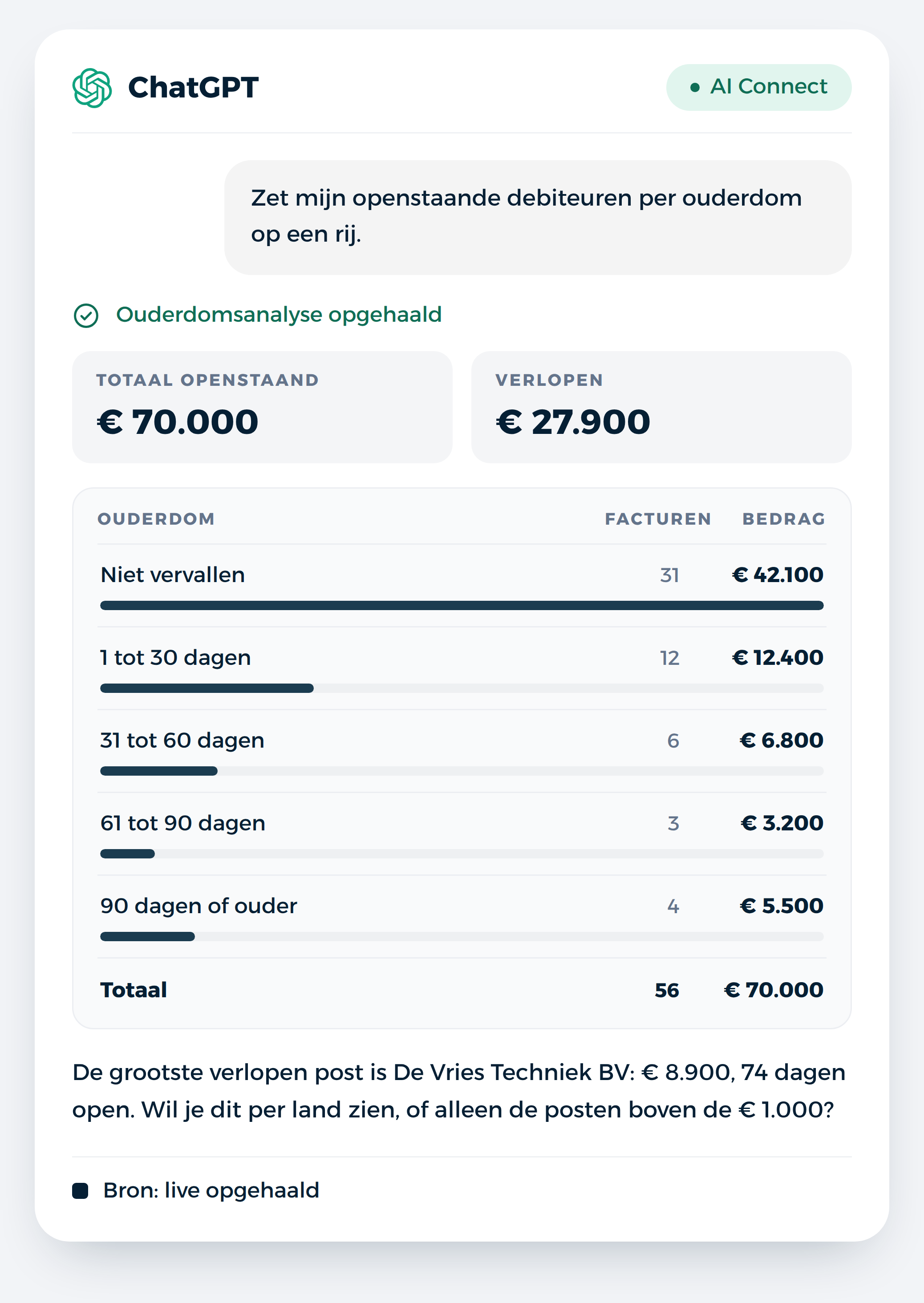
ChatGPT can't do that: overviews belong to the conversation and don't refresh on their own. If you want a live dashboard that you keep and that pulls up the current figures when you open it, you can do that with the same connector in Claude.
From answer to overview
An answer in the chat is useful for a single question. If you want to see a development or compare things side by side, you ask ChatGPT to turn it into a table or chart. It appears straight away in the conversation, with the figures that come out of your administration at that moment.
You simply ask:
Put my revenue per month for this year in a chart, with last year next to it.
If you want to see it differently, you adjust it in plain language: make it a bar chart, add the amounts or show only the last six months. No BI tool, export or implementation project is involved.
Do keep in mind that such an overview is a snapshot. It stays in the conversation, but it does not update itself. If you want to see the current state next month, you ask ChatGPT to make it again.
Overviews that work well:
If you see something in the overview you want to act on, you handle that in the same conversation. Ask ChatGPT, for example, to draw up a reminder for the customers with the oldest outstanding items. It first shows what it wants to do and only carries it out once you give your approval.
Creating charts and overviews in ChatGPT · creating and editing data
Who benefits most from this
ChatGPT or Claude?
Both use the same connector and pull the same data from your administration. The difference is in how they handle your question and in what you can do with the answer afterwards.
ChatGPT is strong when you want a quick answer and want to act on it right away, such as an explanation for your management or an email to a client who pays late. Many teams already work in it every day, and on Business and Enterprise the administrator sets up the connector for everyone. On the other hand, you turn the connector on per conversation and add it yourself as your own plugin, which takes a few more steps.
Claude works through a question in steps and shows which data it retrieves along the way. That is handy for analyses that need multiple queries, and when you keep asking about the same topic for a long time. In Claude you can also build a live dashboard that you save and that retrieves the current figures when you open it.
If you are in doubt, start with the assistant you already have. You can always switch or use both, because your subscription with us is tied to your administration and not to the assistant.
How to connect ChatGPT to your accounting · AI connectors compared
SUBSCRIPTIONS
per user per month
What it costs
You pay per user per month and can cancel monthly. There are no start-up costs, and the first 30 days are free, so you can try it on your own figures. Your ChatGPT subscription runs separately through OpenAI.
With Essentials you handle the daily work: looking up invoices, orders and customers, creating overviews and having things recorded. That costs € 29 per user per month. Analytics is there for analyses across your entire administration, such as margin per item or comparisons over several periods, and costs € 79. Pay annually and you get a 10% discount.
One administration is included. If you work in more administrations, such as an accountancy firm, you pay a surcharge per extra administration that drops as you connect more of them.
The sum is simple: if a monthly closing or a recurring overview goes an hour faster, you have already earned back the connector that month.
Why through iWebDevelopment?

Three bookkeeping packages
Exact Online, AFAS Profit and Twinfield. Connect several under one account.

You stay in control
Looking things up is instant. For creating, changing or deleting, ChatGPT asks you first.

Security guaranteed
The connector uses your own authorisation and complies with ISO 27001.

Professional support
Choose from various SLA options, or let us do the installation.
iWebDevelopment is ISO27001 certified
Your data is safe with our ISO 27001 certification
- ISO 27001 Certification: We meet the strictest ISO 27001 standards, so your data is protected to the fullest. Work with confidence, knowing your data is in safe hands.
- Privacy guaranteed: Privacy is not a side issue for us, but a core value. Our processes are designed to protect your data as much as possible.
- Security as a foundation: From authentication to processing, every part of our solution meets the highest information security requirements.

ISO 27001
CertifiedStill have questions? Schedule a free consultation
In 30 minutes, we'll review your situation together and show you live what the connector can do for you. You'll speak directly with one of our specialists.
Schedule your free consultationCompletely non-binding, no obligations
Instantly confirmed
Related articles

Frequently asked questions
Every subscription works, including the free account. With Business, Enterprise and Education your administrator must allow adding your own connectors; he can then also publish the connector for the whole team right away.
You add our connector to ChatGPT as your own plugin (a custom MCP server). OpenAI warns that you should only add connectors you trust. Our connector works with the permissions you grant in your accounting package, so ChatGPT cannot see beyond those user rights. iWebDevelopment is ISO 27001 certified.
Usually it is switched off in that conversation. Turn it on through the + menu and name it in your question. If that does not help, open a new conversation. If it keeps failing, remove the connector once via chatgpt.com/plugins and add it again.
ChatGPT asks for confirmation before it records anything, and shows what it wants to send. It can offer to remember your choice for the rest of the conversation. For accounting we recommend not doing that and confirming each entry, invoice or change separately.
That depends on your subscription. On Business, Enterprise and Education, OpenAI does not use company data for training by default. On the free account, Plus and Pro, training is on by default. You turn it off via Settings, Data controls and the option "Improve the model for everyone". Do that before you use financial data in ChatGPT, because the setting only applies to new conversations.
Yes, on Business and Enterprise. The administrator publishes the connector once in the workspace settings, after which colleagues find it among their apps. Each colleague then grants permission for the accounting package themselves and works with their own rights.
With Exact Online and Twinfield, only what your user is allowed to see. Administrations or accounts you have no rights to stay closed for ChatGPT as well. With AFAS Profit, the connectors you open up determine what ChatGPT can retrieve.
The connector retrieves your data the moment you ask a question and passes it on to ChatGPT. For the heavier Analytics analyses this happens in a protected environment in the EU. What we process and for how long is set out in the data processing agreement you conclude with us, and iWebDevelopment is ISO 27001 certified. What OpenAI does with the conversation falls under the terms of your ChatGPT subscription.
The figures come directly from your accounts; the connector does not make anything up. How ChatGPT summarises or recalculates those figures is up to OpenAI. In the conversation you can expand each call to the connector and see what was retrieved. If you use an outcome for a tax return or a report, check it in your package.
The method is the same, the scope is not. Exact Online also opens up projects, payroll, production and stock. Twinfield is financial and delivers totals already calculated. With AFAS it depends on the connectors in your environment.
A table or chart it can, right there in the conversation, and you can have it adjusted until it is correct. A dashboard that updates itself it cannot: it stays a snapshot of the moment you asked. If you do want that, it can be done with the same connector in Claude.
Essentials costs €29 and Analytics €79 per user per month, with a 10% discount on annual payment. You pay for your ChatGPT subscription at OpenAI separately. You start with 30 days free and cancel monthly.
In two places, depending on what you want. If you remove the app in ChatGPT, it is gone from your conversations. If you withdraw the permission in your accounting software, the connection itself is broken.
Yes. The same subscription also works with Claude and Microsoft Copilot. You are not tied to ChatGPT.