





Connect Claude to your accounting
Claude is Anthropic's AI assistant. With a connector Claude reads along in your administration and answers from your own figures, instead of from whatever the model once read on the internet. Works with Exact Online, AFAS Profit and Twinfield.
You ask your question in plain English. Claude retrieves the data, calculates where needed and shows where the answer comes from.
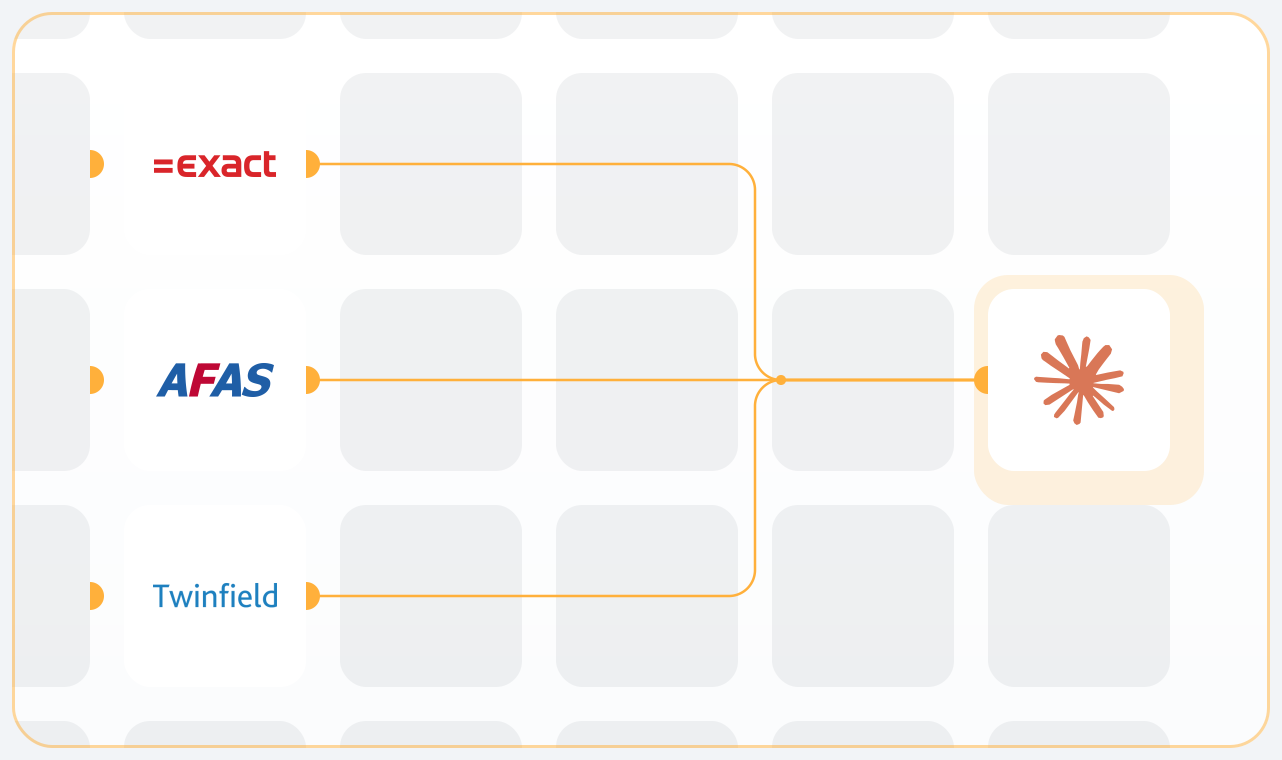
Works with Exact Online, AFAS Profit and Twinfield
We are a recognised partner of Exact Online, AFAS and Twinfield, and for all three we have built our own AI Connect connector. You install the connector for your package, grant permission with your own login details and ask your question in plain language. The way of working is the same everywhere, but what is available differs per package and per environment.
Exact Online
Besides the financial administration you can also access your projects and hours, your payroll administration, your production orders and your stock per warehouse. A question such as "what part of the recorded hours is already on an invoice" fits right in.
AFAS Profit
The connector works through connectors, so you decide for yourself what you make available. Turn them all on and Claude can access your entire Profit environment. If you want to keep it to the financial administration, you only turn on those connectors.
Twinfield
The financial administration, with figures that are supplied already totalled. A trial balance, a profit and loss statement or a VAT overview is therefore quickly on your screen, without anything still having to be added up along the way.
What is available in your environment depends on your package and on your own rights. On the package pages you can see per connector exactly what is ready for use.
What you can ask Claude
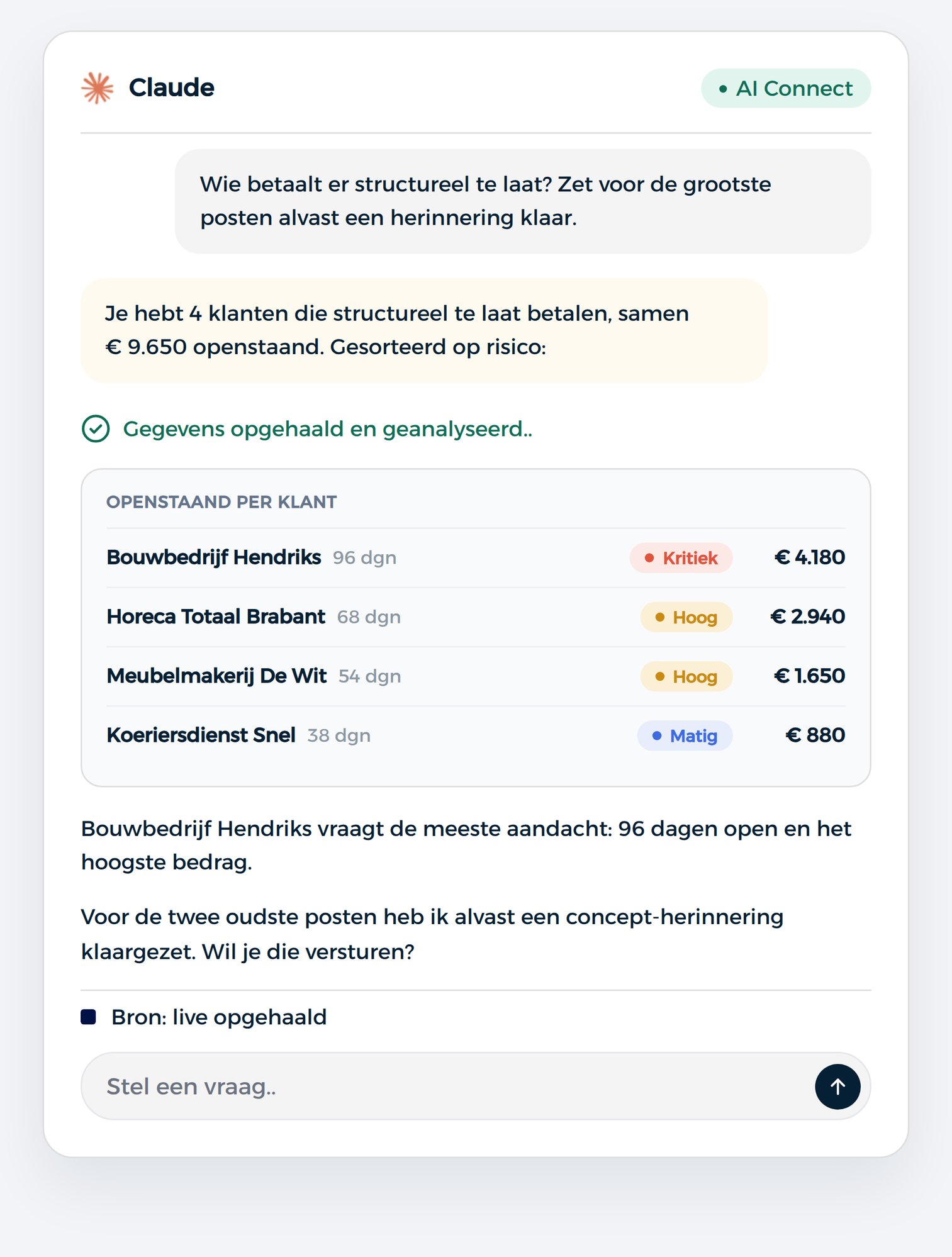
Claude works through a question in steps. If you ask about your margin per product group, it does not pull up one ready-made list. It first works out which data it needs, retrieves it and sets it side by side. You see those steps go by, so you can follow how the answer comes together.
That makes Claude especially suited to the work you now do in a spreadsheet. For example:
You can keep asking follow-up questions without starting over. Begin with your revenue for the quarter, zoom in on one customer, compare with last year and then ask for a summary. Claude keeps the whole thread. For a month-end close that saves a lot of repetition.
If you also want Claude to record something, an invoice, a reminder or an entry, that is possible. Claude first shows what it intends to do and only carries it out after you give the go-ahead. Nothing goes to your administration without confirmation.
Asking questions to your accounts · making financial analyses
Use cases
What can Claude do for you?
From a quick check to an analysis that would otherwise take you an afternoon. Click a topic to see what is possible, and copy an example to start with it straight away in Claude.
Financial
6 examples
Which invoices have been outstanding for more than 60 days?
All outstanding items, sorted by age.
Which credit notes have not yet been matched?
Credit notes not yet matched against any invoice.
Is my accounts receivable balance rising?
Compares the position with six months ago and shows where it sits.
What is my average payment term this quarter?
Puts the payment behaviour next to last quarter.
Prepares payment reminders for everything over 30 days.
Drafts that you approve for sending.
Create a draft sales invoice based on the previous one.
Takes over lines and rates from that customer's last invoice.
VAT and checks
6 examples
Does my VAT return match the general ledger?
Compares this quarter's return with what has been booked.
Which suspense accounts are not at zero?
All suspense accounts with a balance.
Which entries have no VAT code?
Entries where the VAT code is missing, with amounts.
Which foreign customers were charged Dutch VAT?
Finds VAT codes that do not match the customer's country.
Do credit notes differ from the original invoice?
Compares the VAT percentage of both.
Which purchase invoices differ from this supplier?
Flags deviating percentages or amounts.
Revenue, customers and margin
6 examples
Put my revenue per month next to last year.
Twelve months side by side.
Which ten customers deliver the largest part of my revenue?
Ranks customers by their share.
What is my margin per product group?
With the comparison against the same period last year.
Which customers have started buying less?
Sorted by the difference in euros.
Which customers bought last year but not this year?
Customers who dropped off.
Which customers pay late but are still growing?
Payment behaviour alongside revenue development.
Costs and suppliers
6 examples
Put my costs per general ledger account next to last year.
Including the three biggest shifts.
Which fixed costs rose without any extra volume?
Subscriptions and recurring costs that became more expensive.
Which suppliers do we spend the most with?
The largest suppliers, with last year alongside.
Which purchase invoices fall due this month?
Outstanding creditors by due date.
Prepare this purchase invoice as a draft entry.
On the right general ledger account, you approve.
Record this new supplier.
Creates the relation with the details you provide.
Month-end closing
6 examples
Which bank entries have not been processed yet?
What is still outstanding in the bank book.
Are all suspense accounts at zero?
It goes through them and reports the discrepancies.
Which periods are still open?
Financial years and periods that have not been closed yet.
Compare this month with last month.
The biggest shifts in revenue and costs.
Are there any entries that deviate from the pattern?
Outliers in amount or frequency per account.
Summarise this month's figures in plain language.
An explanation you can forward.
Projects, stock and production
6 examples
How many project hours were logged this month?
With the part that has already been invoiced.
Which items are below the reorder point?
Per warehouse, what needs to be replenished.
What is the lead time of open production orders?
How long orders have already been open.
Which projects are running over budget?
Hours spent and costs against the budget.
Which stock has been idle for more than six months?
Items without movement, along with their value.
What is the value of my stock per warehouse?
Compared with last quarter.
What is MCP, and why do you not have to install anything?
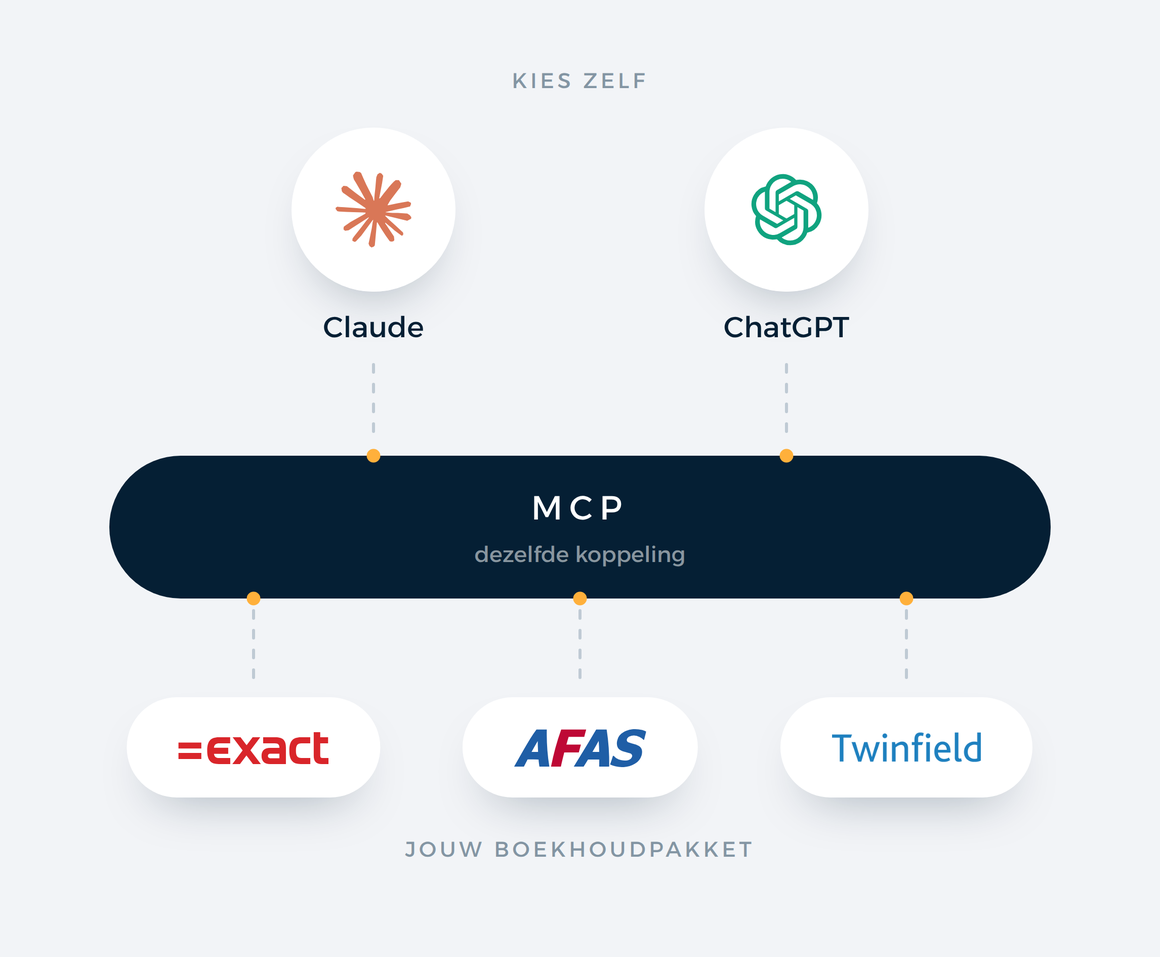
MCP stands for Model Context Protocol, an open standard that lets an AI assistant connect to an external system. Anthropic published it and most major AI assistants now support it. For you it means no software is installed on your computer and you do not have to program anything.
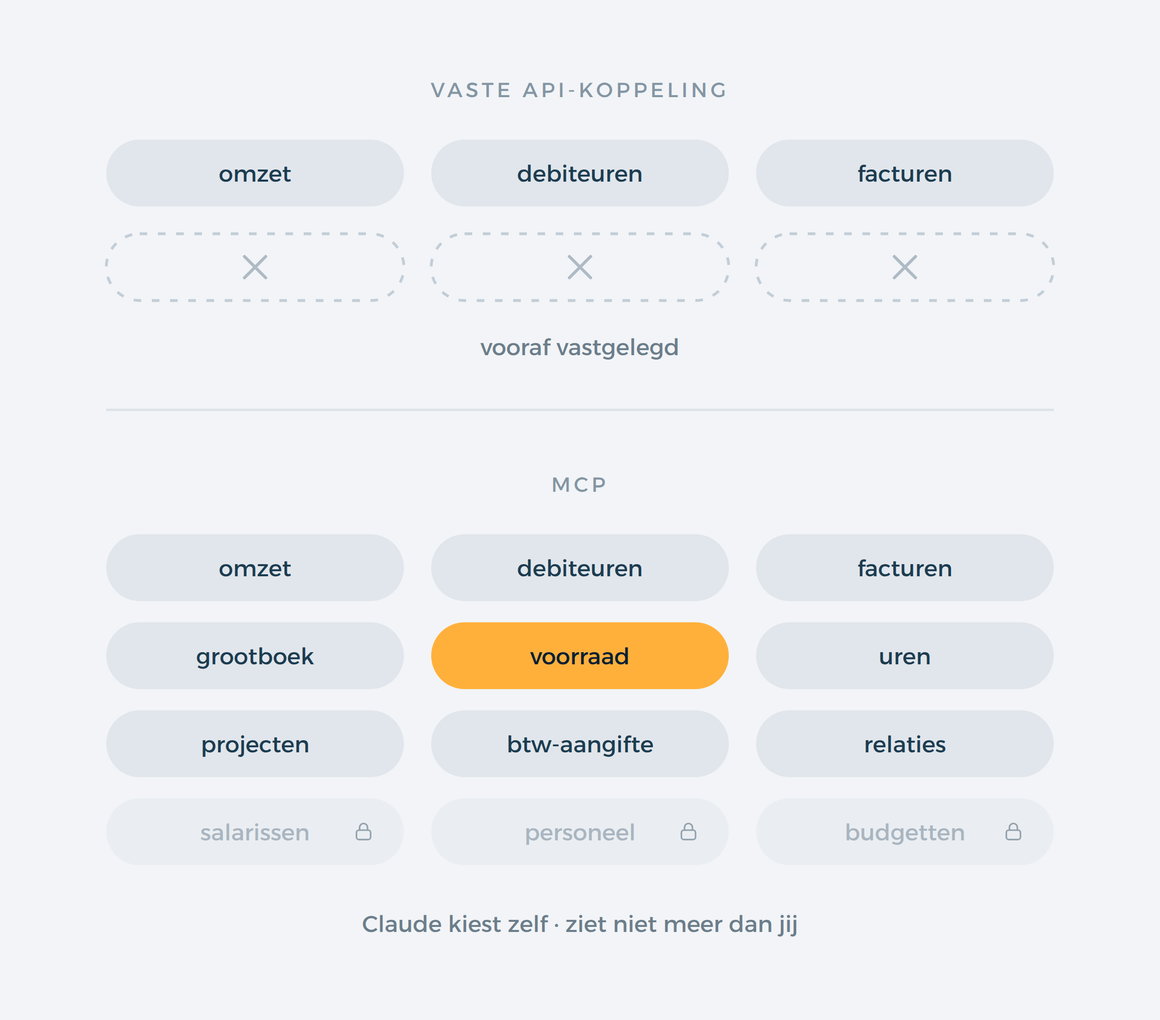
The difference with a regular API connector lies in this. With an API connector, a developer decides in advance which data goes back and forth, and if you want to know something else, the connector has to be modified. With MCP, Claude gets a list of things it is allowed to do and chooses for itself what it needs for your question. That is why you can ask something that no one thought of in advance.
The connection runs through your own account. You log in to your accounting package and grant permission, just like with a webshop connector. This gives Claude exactly the rights that you have, no more.
How the connector works: Exact Online · AFAS Profit · Twinfield
How to connect Claude to your administration
You install nothing on your computer and you need no technical knowledge. Count on a few minutes.
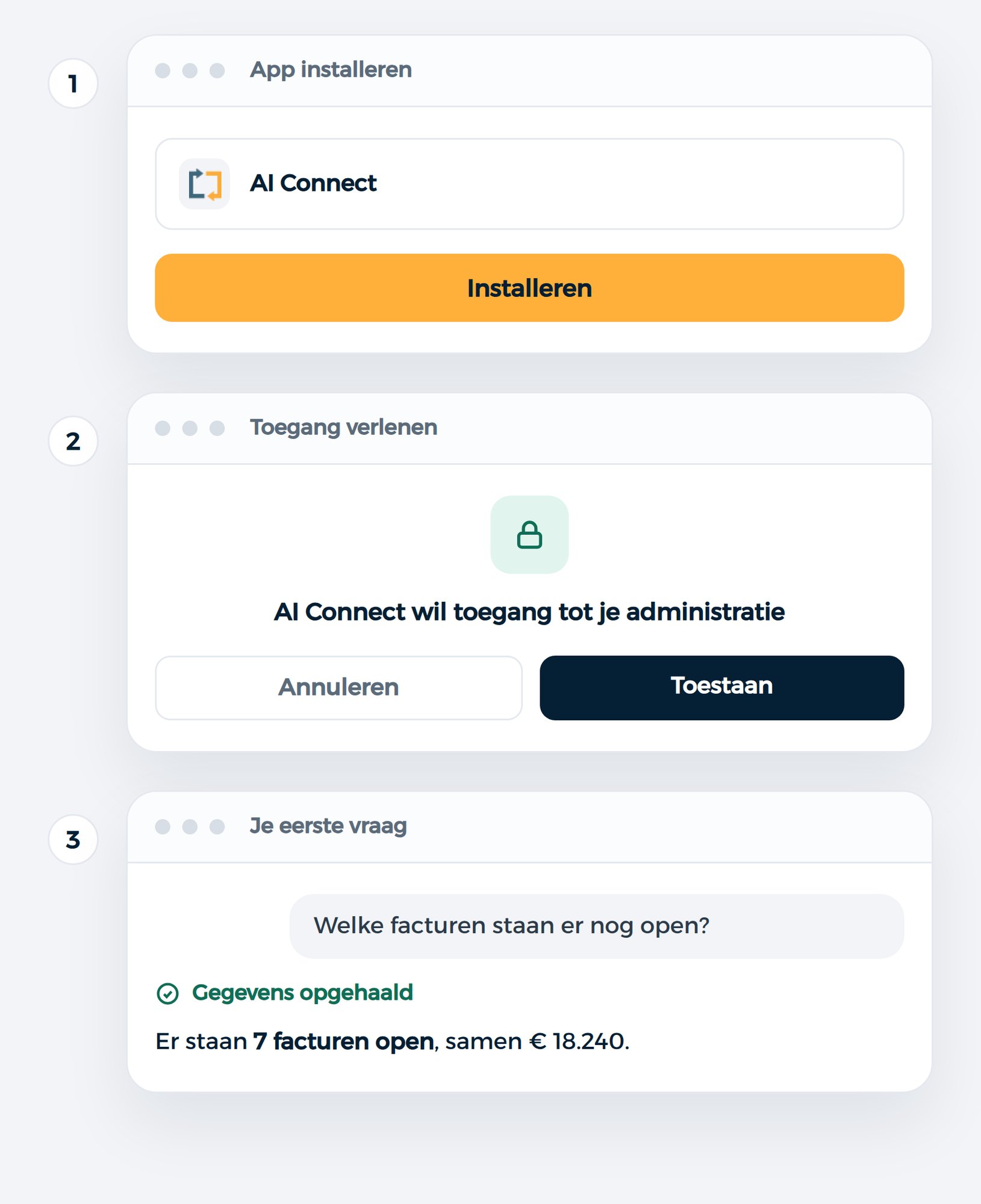
1. Install the app
Search for the AI Connect app of your accounting package in Claude and click Install. That works on any Claude subscription, including the free plan. If you work in a Team or Enterprise account without administrator rights, it will say Request and the request goes to your administrator.
Straight to the app in Claude: Exact Online · AFAS Profit · Twinfield.
2. Grant access
Click Connect next to the connector. Your browser opens the login screen of your accounting package, you log in with your own account and click Authorise. You only have to do this once, and you can withdraw the permission later in your accounting package itself.
3. Your first question
Open a new conversation and ask what you want to know. Per conversation you switch the connector on or off through the plus button at Connectors.
The connector is tied to your Claude account and not to a single device, so it works both on claude.ai and in the desktop app.
Step by step: Exact Online · AFAS Profit · Twinfield
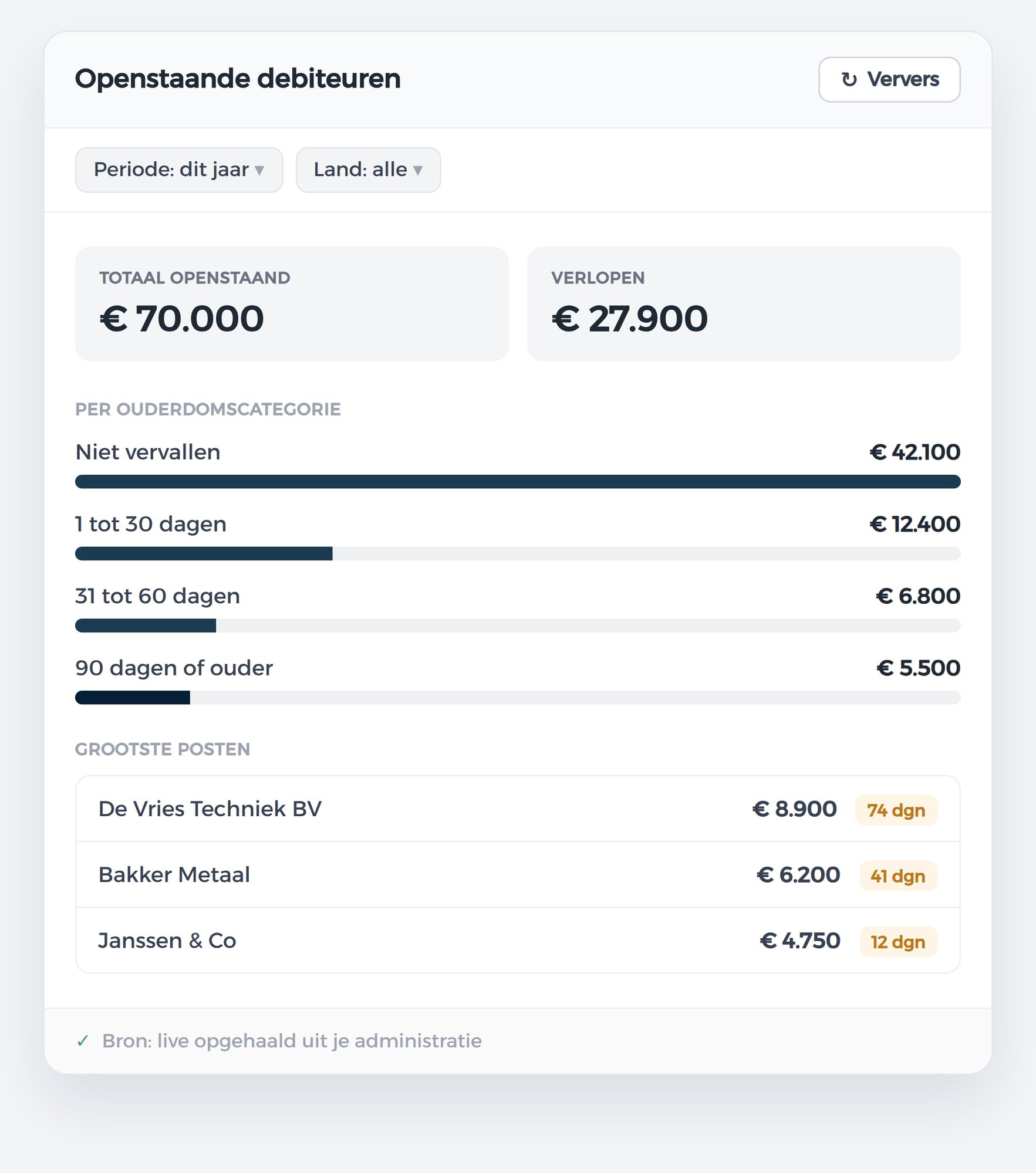
A BI project pays off when ten people look at the same fixed report every day. For an overview you need a few times a month, it is months of work for something that stays fixed afterwards. Here you ask a question, and if the question changes, the overview changes along with it.
From answer to dashboard
An answer in a chat is nice, but next week you want to see it again without asking the question once more. That is why Claude turns it into a separate overview that you save and reopen.
You build it by asking for it:
Create a dashboard of my outstanding receivables, split by age and by country.
If something is off, you adjust it in plain language: add a chart, add a filter by country, or show only items older than thirty days. No data warehouse, no extra licences, no implementation project.
Where you create it determines how it behaves afterwards. If you make it in an ordinary conversation, it belongs to that chat and is a snapshot: if you want fresh figures, you ask for them. If you make it in Claude Cowork, it stands on its own in your Artifacts screen and refreshes automatically as soon as you open it. That last option works in the desktop app on a paid Claude subscription.
Overviews that work well:
A dashboard is not only there to look at. From the same overview you can set up a reminder or update a payment term. Such actions are never carried out just like that: Claude prepares them as a draft and you approve them.
Who benefits most from this
Claude or ChatGPT?
Both work with the same connector and the same data. The difference is in how they approach a question and in what you get around it.
Claude works through a question in steps and shows those steps, so with a question that takes several queries you can follow how it arrives at the answer. It keeps to the thread when you ask twenty follow-up questions on the same topic, which helps during a close. And you can turn an answer into a dashboard that you save, like the one above.
ChatGPT is more widely adopted and many offices already have a subscription for it. For questions that are done in a single query, you notice little difference.
Does your office already work with one of the two? Then start there. You can switch later or use both, because the connector is tied to your administration and not to one assistant.
How to connect Claude to your bookkeeping · AI connectors compared
SUBSCRIPTIONS
per user per month
What it costs
You pay per user per month and you can cancel every month. There are no setup costs, and you start with 30 days free so you can try it on your own figures first before committing to anything.
Essentials is for everyday work: asking questions about invoices, orders and customers, requesting overviews and having things recorded. That costs €29 per user per month. Analytics comes on top of this if you want analyses across your entire administration, such as margin per item or comparisons over multiple periods, and costs €79. With annual payment, 10% comes off.
The first administration is included. If you work in multiple administrations, for example as an accountancy firm, then you pay an amount per extra administration that becomes lower the more you have.
What it delivers is hard to capture in a single figure, but the sum is simple: if a monthly close or a recurring report goes an hour faster, the connector has already paid for itself that month.
Why through iWebDevelopment?

Three accounting packages
Exact Online, AFAS Profit and Twinfield. Connect several under one account.

You stay in control
Requesting is instant. Creating, changing or deleting is first put to you by Claude.

Security guaranteed
The connector uses your own authorisation and complies with ISO 27001.

Professional support
Choose from various SLA options, or have us do the installation.
iWebDevelopment is ISO27001 certified
Your data is safe with our ISO 27001 certification
- ISO 27001 Certification: We comply with the strictest ISO 27001 standards, so your data is optimally protected. Work with confidence, knowing that your data is in safe hands.
- Privacy guaranteed: Privacy is not a side issue for us, but a core value. Our processes are designed to protect your data to the maximum.
- Security as a foundation: From authentication to processing, every part of our solution meets the highest requirements in the field of information security.

ISO 27001
CertifiedStill have questions? Schedule a free consultation
In 30 minutes, we'll review your situation together and show you live what the connector can do for you. You'll speak directly with one of our specialists.
Schedule your free consultationCompletely non-binding, no obligations
Instantly confirmed
Related articles

Frequently asked questions
The connector works on the paid Claude subscriptions. Which subscription types support connectors is determined by Anthropic, and that changes from time to time, so check with Anthropic itself.
Claude sees exactly what your own account is allowed to see, nothing more. The connector uses your login details, so administrations, daybooks or general ledger accounts that are hidden from you stay hidden from Claude too. With AFAS you also decide this yourself through the connectors you switch on.
Yes, but never without you noticing. Claude first shows what it wants to record, and only after you give your approval does it go to your administration. In practice this involves draft entries, draft sales invoices, contacts and reminders. What exactly is possible differs per accounting package.
Exact Online makes the most available. Alongside the financial administration you also reach projects and hours, payroll, production orders and stock per warehouse. Twinfield is a financial package, so those four topics are not included. With AFAS it depends on which connectors are switched on in your environment: switch them all on and your entire Profit environment is available.
Yes. The first administration is included in your subscription, after which you pay per extra administration, and that rate drops the more you have. For each question you indicate which administration you mean.
The connector retrieves the data directly from your administration and only passes on what is there. How the AI assistant then turns that into an answer is determined by the provider of that assistant and not by us. So treat it like any other tool: if you use a result for a tax return, a report or a conversation with a client, check it in your package before you send it on.
Yes. The same connector also works with ChatGPT and Microsoft Copilot. You are not tied to one assistant.
Essentials costs €29 per user per month, Analytics €79. With annual payment 10% comes off that. There are no setup costs, you cancel monthly and you start with 30 days free. Extra administrations are a surcharge with a tiered scale.
With a normal question the data is retrieved the moment you ask it. For the heavier analyses in Analytics this runs through a secured environment in the EU, separated per administration. What exactly is recorded and for how long is set out in the data processing agreement you conclude with us. iWebDevelopment is ISO 27001 certified. What the AI assistant does with a conversation on its side falls under the terms of that provider.
Yes, at any time, in your accounting package itself. You withdraw the permission and the connection is broken.
Yes, and it is one of the most common uses. You connect per client administration and work with the same authorisations you already have. You arrange the data processing agreement with us, as with every connector.
For part of the work, yes. A BI project with a data warehouse and licences pays off when a fixed report is used daily by an entire department. For overviews you need a few times a month, or that are always slightly different, asking and answering is faster and cheaper. The two do not rule each other out.