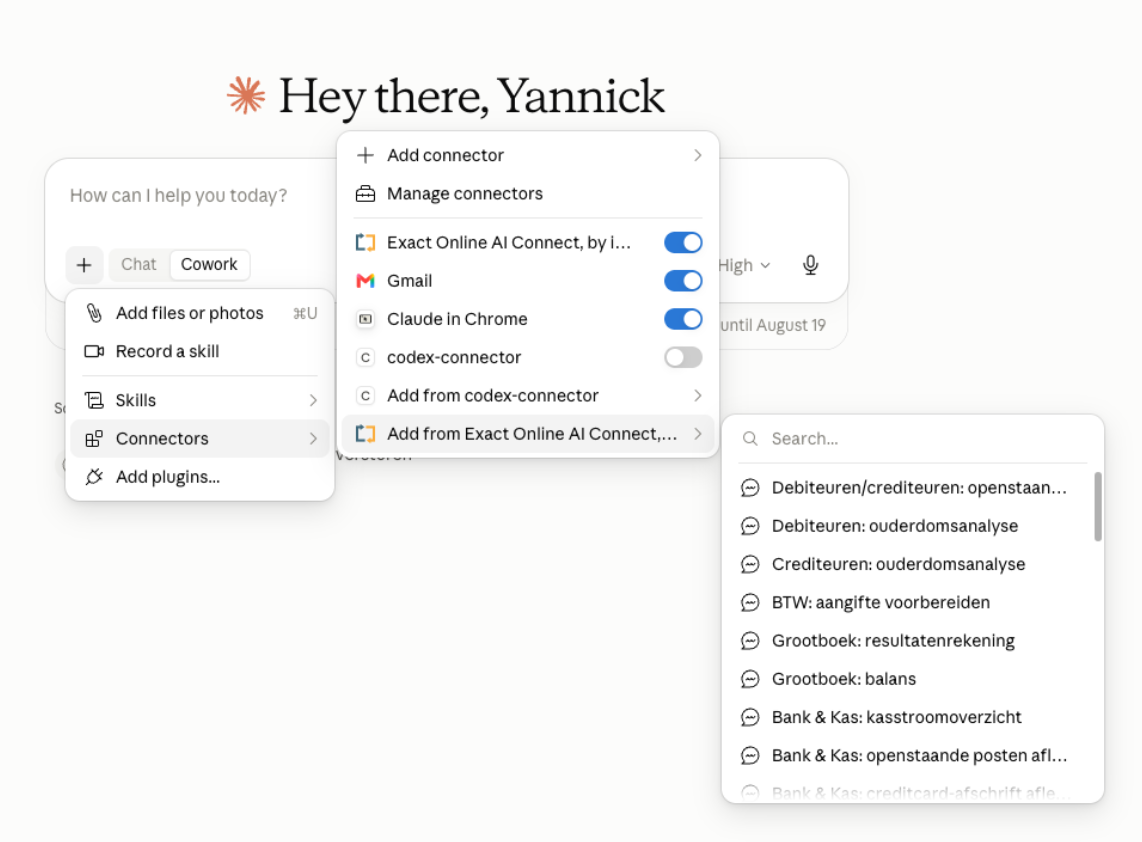
Your first question to your administration is that easy to ask. In this article you will read what you can ask Claude, with example questions per topic and the overviews and tasks you use most often.
Your very first question
Start small. For example, ask:
"Which invoices have been open for more than 30 days?"
You do not get an export that you still have to filter, but a direct answer from your live administration. And you can ask follow-up questions right away, more on that later. This page is about Claude. If you work with a different AI assistant, retrieving your figures works the same way, although the screens and the way you start a saved question differ.
What can you ask about?
Example questions per topic. You can copy them exactly or adjust them to your own customers, items and periods. Retrieving and Analysing only read your administration. Creating first prepares a draft in the assistant that you approve.
Financial
Outstanding items, invoices, entries and results.
Retrieve
"What is Janssen BV's revenue this year?"
The total revenue of a customer for the current year.
Retrieve
"Show all customers with an overdue payment."
Customers with invoices past their due date.
Analyze
"What is my result for this period?"
Revenue minus costs for the chosen period.
Create
"Create a new purchase entry."
Prepares a purchase entry that you approve yourself.
Create
"Create a bank entry for my credit card statement."
Processes your credit card statement into an entry that you approve.
Analyze
"Compare my costs this quarter with last year."
Places your costs alongside the same period last year.
Customers and suppliers
Search, create and update contacts.
Retrieve
"Give the contact details of customer Bakkerij de Groot."
Address, e-mail and contacts of an account.
Retrieve
"Which customers do not have an e-mail address?"
Finds accounts with missing details.
Analyse
"Which customers have not ordered anything this year?"
Flags inactive customers for follow-up.
Create
"Add a delivery address to Janssen BV: Industrieweg 5, Rotterdam."
Records an extra address for an account.
Create
"Set customer Janssen BV to a payment term of 30 days."
Changes the payment condition of an account.
Create
"Create a new supplier with name and address details."
Sets up a new supplier in Exact Online.
Sales and purchase orders
Look up, create and follow up on orders and quotes.
Request
"Which quotes are still open?"
All quotes issued that were not yet followed by an order.
Request
"Which delivered orders have not been invoiced yet?"
Flags revenue you still need to invoice.
Create
"Create a new sales invoice for customer Janssen BV."
Prepares a sales invoice that you approve yourself.
Create
"Update the quote for De Vries and add item A1001."
Updates an existing quote with an extra line.
Create
"Turn an accepted quote into a sales order."
Converts the quote into an order in one go.
Analyse
"Which supplier delivers late most often?"
Assesses delivery reliability across your purchase orders.
Stock and warehouse
Real-time stock, locations and mutations.
Request
"What is the available stock of item A1001?"
Stock minus what is already reserved for orders.
Request
"Which stock movements were posted today in the Rotterdam warehouse?"
Today's receipts, deliveries and transfers.
Analyze
"Which items have not sold in the past 90 days?"
Finds slow movers for your stock cleanup.
Create
"Create a new item: code SCH-M10, description Screw M10x30."
Records a new item in Exact Online.
Create
"Set the minimum stock of item A1001 to 250 in the Amsterdam warehouse."
Changes the minimum stock per warehouse.
Create
"Check the minimum stock and prepare the purchase orders for anything that falls short."
Combines the stock check with ready-made purchase suggestions.
Production and assembly
Work orders, materials and completion reporting.
Retrieve
"Which work orders are scheduled for this week?"
Your production planning for the coming days.
Retrieve
"Do I have enough material in stock for work order WO-2026-0042?"
Checks the bill of materials against current stock.
Analyse
"Which work orders are running behind the planned end date?"
Flags delays in production.
Create
"Register 2.5 hours on the Assembly operation of work order WO-2026-0042."
Books time on a production step.
Create
"Change the quantity to be produced for WO-2026-0042 to 200 units."
Updates an existing work order.
Create
"Report work order WO-2026-0042 as fully complete and book back the leftover material."
Closes the order and corrects the stock in one go.
Analyses and overviews
Deeper analyses across your entire administration. These use the Analytics subscription. You can read more about this in creating financial analyses in Claude.
Analyse
"Create a cash flow forecast for the coming 3 months based on outstanding receivables and payables."
Projects your liquidity from expected incoming and outgoing payments.
Analyse
"Give an aging analysis of my receivables and name the biggest risk items."
Breaks down outstanding invoices by age and flags the risks.
Analyse
"Calculate my gross margin per product group and show where it drops the hardest."
Combines revenue and purchase value into margin insight per group.
Analyse
"Compare my actual costs per general ledger account with last year and explain the biggest deviations."
Flags cost items that fall out of line year on year.
Analyse
"Which suppliers can I pay later without exceeding a due date?"
Optimises your outgoing payments based on the due dates.
Analyse
"Calculate my DSO, DPO and working capital requirement and compare with the previous quarter."
Key figures for working capital management in one analysis.
Ready-made questions
Some overviews and tasks you use again and again: your outstanding items, your balance sheet, preparing your VAT or reconciling your bank. These are ready and waiting for you, so you don't have to formulate them yourself.
You can start them in two ways. Choose them directly from the Exact AI Connect menu, or simply type the question yourself (the opening phrase is listed with each one). You can run them as they are, or add extra context, for example a period or a specific customer. These are the questions available now:
You can also choose these questions directly from the Exact AI Connect menu.
Accounts receivable and accounts payable
Outstanding items
Shows in a single overview all invoices that have not yet been paid or received, on both the accounts receivable and accounts payable side. For each item you see the amount and the due date, so you know right away what is still coming in and what you still have to pay.
Here's how to start it: "Show my outstanding items for accounts receivable and accounts payable."
Accounts receivable aging analysis
Splits your outstanding receivables by age, for example 0 to 30, 30 to 60, 60 to 90 and 90 days or older. This way you see at a glance where the payment risk lies and which customers need follow-up.
How to start it: "Create an aging analysis of my accounts receivable."
Accounts payable aging analysis
The same overview, but for what you still owe suppliers, split into the same age categories. Handy for planning what needs to be paid and when, and for spreading out payment peaks.
How to start it: "Create an aging analysis of my accounts payable."
General ledger and VAT
Profit and loss statement
Prepares your profit and loss overview for a chosen period, with your revenue, costs and the result below it. You do not have to set up or export a report yourself.
How to start it: "Show my profit and loss statement for this quarter."
Balance sheet
Shows your balance sheet at a chosen moment, with your assets and liabilities neatly set against each other. Ideal for a quick overview or as preparation for a meeting with your accountant.
How to start it: "Show my balance sheet as at the end of last month."
Prepare VAT return
Prepares the VAT figures per section so that all you have to do is check them. This question prepares the figures; you file the return itself through the usual channels.
How to start it: "Prepare my VAT return for this quarter."
Bank and Cash
Cash flow statement
Shows your incoming and outgoing cash flows over a period, so you can see where your money comes from and where it goes. Useful for staying in control of your liquidity.
How to start it: "Create a cash flow statement for the past 3 months."
Reconciling open items
Matches open items against each other and makes suggestions for the cases that do not add up on their own. The suggestions are prepared as a draft; you approve them before anything is recorded.
How to start it: "Reconcile my open items and give suggestions for the tricky cases."
Reconciling a credit card statement
Processes your credit card statement into entries and connects them to the associated items. Here too everything is first prepared as a draft that you approve before it becomes final.
How to start it: "Process my credit card statement and prepare the entries."
Tip: a question that creates or reconciles something first prepares the result as a draft. You review and approve it before anything changes in Exact Online.
Asking follow-up questions: from overview to insight to action
You do not have to stop at one question. Every answer builds on the previous one, without you having to search or filter again. For example:
1"Which invoices have been outstanding for more than 30 days?"
2"Which of those are from the same customer?"
3"Draft a reminder for that customer."
In just a few sentences you go from an overview to a concrete insight and, if you want, to an action that you approve.
Not just asking, but having things done too
The questions labelled Create show that the connector can do more than just retrieve data. You can have invoices, quotes, contacts and bookings prepared or updated. Everything that gets saved is first prepared as a draft that you approve. So nothing ever changes in your administration without you having looked at it. You can read exactly how this works in creating and editing data in Claude. The questions with Retrieve and Analyse only read: they change nothing.
How to get further
Stuck or want to know whether something is possible? Just ask your assistant, for example "What can you do for me in Exact Online?" The assistant will then tell you what is possible with your administration.
Tip: in your control panel you can see exactly what the assistant has done in the activity logs, and manage your settings and access.
No Exact AI Connect yet?
Connect your Exact Online administration to your AI assistant and ask your first question within a few minutes. You stay in control with every action.
Yes. You connect Exact Online to your AI assistant once and then ask your questions in plain language. The answers come straight from your own, up-to-date administration.
Yes. You connect Exact Online to your AI assistant once and log in with your own Exact Online account. After that the assistant can read your administration and answer your questions.
No. You simply ask your question in plain language, just as you would ask a colleague. The examples on this page are a starting point, but you are free to adjust them.
Yes, and that is exactly the strength. Each answer builds on the previous one, so you can go from an overview to a detail to an action without having to search or filter again.
A one-off question you type entirely yourself. A ready-made question is already waiting for you in the Exact AI Connect menu, so all you have to do is choose it. You can run it as it is, or add extra context such as a period or a customer.
Yes. If you have connected several administrations, you indicate in your question which one you mean. If you are not sure which ones are connected, just ask "Which administrations do I have?"
Yes. The answers come live from your Exact Online administration at the moment you ask the question. So you are not working with an export from yesterday.
Rephrase your question or make it more specific, for example by adding a period or a customer name. You can also simply say that the answer was not correct, and the assistant will try again.
No. Questions that retrieve or analyse only read. If you want something created or changed, the assistant first prepares it as a draft and you approve it before it is stored definitively in Exact Online.








.png)









.png?width=46&height=46&name=vecteezy_artificial-intelligence-ai-processor-chip-vector-icon-symbol_6662139%20(1).png)