.png)








Automating stock management: from webshop to Exact Online and back
Between a customer placing an order and another channel showing the same stock, there is a maximum of five minutes. Within those five minutes a sales order has to be processed, the stock change has to be carried out, and every connected system has to know the new level.
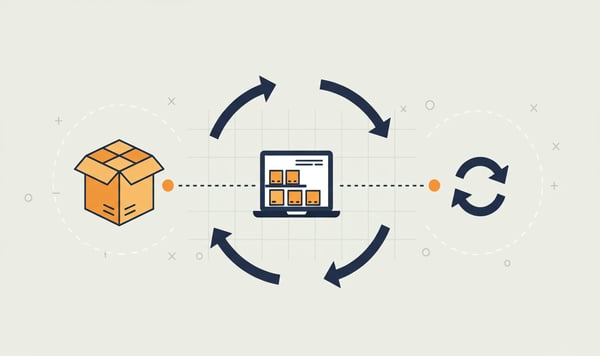
Five minutes. That is the margin.
Between a customer placing an order and another channel showing the same stock, there are at most five minutes. Within those five minutes a sales order must be processed, the stock adjustment must be applied, and every connected system must know the new figure.
That is the reality of stock synchronisation with Exact Online. It sounds tight. It is tight, provided you have the right connector, the right Exact Online package, and understand how the synchronisation works per scenario.
This article explains what happens exactly when a product is created, an order comes in, a return is processed or you draw on multiple warehouses. And why the answer differs per situation.
Handel or Handel ERP: the difference that matters
Exact Online offers two packages for companies that sell physical products. The naming is confusing, both have Handel in their name, but the capabilities differ considerably.
Handel (€23.95/month) synchronises in one direction. Orders, items and stock levels go from your webshop to Exact Online. Your webshop is the starting point. Exact Online receives, records and processes.
Handel ERP (€39.95+/month) adds two-way sync. Changes in Exact Online, such as a goods receipt, a stock correction or a price adjustment, flow back to your webshop automatically. And to Bol.com. And to Amazon. Every five minutes, in both directions.
That distinction sounds technical. The consequences are not.
When one-way traffic is enough
Do you sell exclusively through your own webshop? No wholesale, no marketplace, no physical counter? Then Handel may be enough. Your webshop determines what is available. Exact Online keeps the bookkeeping. The flow goes one way and that works.
The moment you add a second sales channel, such as a Bol.com connector, a B2B portal, a counter employee who books in Exact Online, you need two-way synchronisation. Without that feedback your webshop does not know what has been sold or received through other channels.
When you need two-way
Handel ERP is not a luxury once your warehouse is managed from more than one place. A purchase order booked in Exact Online increases the stock in your webshop automatically. A manual correction by your warehouse employee? Visible within five minutes in all sales channels.
Without that synchronisation you get the stock differences that cause overselling. Not because of bad software, but because systems do not know each other's changes.
Scenario 1: creating a new product
Where does an item begin? That depends on your way of working and your package.
With Exact Online Handel you create the product in your webshop: WooCommerce, Shopify, Magento or Lightspeed, or another platform. The connector picks up the item, sends the data to Exact Online, and creates an item card there. SKU, description, price, VAT code: everything is transferred. Your webshop is the source.
With Exact Online Trade ERP it can also work the other way around. You create the product in Exact Online, including purchase price, supplier and cost center, after which the connector automatically forwards it to your webshop. That makes more sense when your purchasing department works in Exact Online and your e-commerce team works in the webshop.
In both cases the product exists in both systems within five minutes at most. No CSV upload, no manual entry, no copy-paste of product numbers.
Scenario 2: an order comes in
This is the scenario that runs every minute at webshops with volume. A customer places an order. What happens?
The connector detects the new order at the next synchronization cycle. The order is created as a sales order in Exact Online, including customer details, product lines, VAT calculation and payment status. At the same time the stock mutation is processed, so the number of available units drops.
That drop is visible within five minutes in all connected systems. Does the same customer sell the last item through your Shopify store? Then your Bol.com listing shows the product as sold out before the next buyer clicks "order".
During peak periods around holidays, Black Friday, December sales or a viral social post, those five minutes are the difference between controlled sell-out and dozens of oversells. You sell what you have. No more.
Scenario 3: processing a return
Returns are the litmus test for every stock connector. The package comes back. The employee checks the contents. And then?
With an approved return the stock has to be restored in three systems at once: in your warehouse (physically), in Exact Online (administratively) and in your webshop (commercially). If one link lags behind, you have a product sitting on the shelf that is not for sale. Lost revenue, without anyone noticing.
With Trade ERP this happens automatically. The return is processed in Exact Online with a credit note, a stock addition and any quality note, after which the connector sends the updated stock level back to all sales channels.
With Trade (one-way) you have to update the returned stock in your webshop manually. That works with five returns a week. At fifty a week it becomes a full-time administrative task that is also prone to errors.
Scenario 4: multiple warehouses
As soon as your stock is spread across more than one location, stock management becomes exponentially more complex. Which warehouse is used for an order? How do you prevent location A from selling out while location B is overstocked?
Exact Online Trade ERP supports multi-warehouse stock management. Each warehouse has its own stock registration. The connector knows which warehouse belongs to which sales channel or region, and uses the right location.
An order from Noord-Holland? Warehouse Alkmaar. A Bol.com order? The central DC. A B2B order for a specific customer? The dedicated storage point set up for that customer.
That routing happens based on rules you configure once. After that it runs automatically. The stock level per warehouse is always up to date, both in Exact Online and in every sales channel connected to it.
With the basic Trade package you work with one stock location. For many web shops that works fine. But once you grow to multiple fulfilment points, Trade ERP is the only way forward.
What exactly gets synchronised?
The connector does not move individual numbers. It is a complete dataset that gets compared and updated every five minutes.
From web shop to Exact Online:
- Sales orders (including customer data, lines, VAT)
- New items and item changes
- Stock movements from sales
- Payment statuses
From Exact Online to web shop (Trade ERP only):
- Stock levels after goods receipt
- Stock corrections and transfers
- Price changes
- Item data (descriptions, categories)
- Order status (shipped, invoiced)
That feedback is what makes the difference. Without feedback, Exact Online is a registration system. With feedback, it is a control mechanism that drives your entire operation.
The choice is operational, not technical
The question "Exact Online Trade or Trade ERP?" is not an IT decision. It is an operational consideration.
Do you sell through one channel, process returns manually and work from a single location? Trade is enough and saves you €16 per month.
Do you sell through multiple channels, process returns in Exact Online, work with a purchasing department that creates items in Exact, or use multiple warehouses? Then Trade ERP is not an upgrade but a requirement. You earn back the price difference with the first oversell you prevent.
In both cases the synchronisation runs every five minutes. In both cases you never have to retype anything manually. The difference lies in the direction of the data flow, and therefore in the control you have over your stock.
One connector, every platform
The stock synchronisation with Exact Online works regardless of your web shop platform. WooCommerce, Shopify, Magento, Lightspeed: the connector is available for every platform and works identically. The same synchronisation frequency, the same field mapping, the same reliability.
Do you also sell through marketplaces? Bol.com and Amazon can be connected too. One central point in Exact Online, multiple sales channels that all show the same, up to date stock level.
More than 2,000 companies run on that infrastructure. ISO 27001 certified, synchronised every five minutes, without manual intervention.
Do the maths yourself. View our web shop connectors →
Frequently asked questions
Handel (€23.95/month) synchronizes in one direction: orders, items and stock go from your webshop to Exact Online. Handel ERP (€39.95+/month) adds two-way sync, so goods receipts, stock corrections and price changes from Exact Online also flow back automatically to your webshop and marketplaces. If you sell through multiple channels or work with multiple warehouses, you need Handel ERP.
The connector synchronizes every five minutes. When an order comes in, it is created as a sales order in Exact Online and the available stock drops within those five minutes across all connected sales channels. This prevents a sold-out item from still being orderable on another channel.
With Handel ERP it is. You process the return in Exact Online with a credit note and stock addition, after which the connector automatically sends the new stock level back to all your sales channels. With the basic Handel package you have to update the return stock in your webshop manually.
Yes, Exact Online Handel ERP supports multi-warehouse stock management. Each warehouse has its own stock registration and the connector addresses the right location per sales channel, region or customer based on rules you set up once. With the basic Handel package you work with a single stock location.
Yes. Besides webshop platforms such as WooCommerce, Shopify, Magento and Lightspeed, you can also connect Bol.com and Amazon. Exact Online is then the central point and every sales channel shows the same current stock level.