.png)








Bank connector with Exact Online: which options do you have in 2026?
MT940, automatic upload or PSD2? Compare all the options to connect your bank to Exact Online and find out which method suits your situation best.
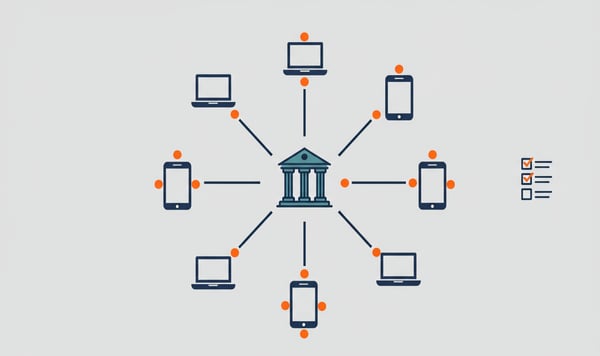
The way your bank and accounting software talk to each other is changing fast. MT940 files, the standard for years, are being phased out step by step. PSD2 and Open Banking are taking over. But what does that mean in practice when you work with Exact Online? And which connection method suits your situation best?
In this article we compare the four ways to connect your bank to Exact Online. From manual to fully automated.
Want to try it yourself? View our bank connector →
Method 1: uploading MT940 manually
The classic approach. You download an MT940 file from your bank, log in to Exact Online and upload the file via the bank statements screen.
Advantages:
- No extra software needed
- Full control over what you import
- Works with almost any bank that supports MT940
Disadvantages:
- Time-consuming and error-prone
- You forget it, or it piles up
- No real-time insight into your bank balance
For a sole trader with ten transactions a month this can work fine. But as soon as you grow, manual uploading becomes a bottleneck.
Method 2: automatic MT940 upload
Some banks offer the option to forward MT940 files to Exact Online automatically. ABN AMRO and Rabobank had solutions for this for a long time.
Advantages:
- Less manual work than method 1
- Files come in daily
Disadvantages:
- Limited to specific banks
- A delay of at least one day
- MT940 is being actively phased out by banks
- Configuration can be technical
The problem with automatic MT940 upload is timing. Banks no longer invest in this technology. ING has already greatly simplified the MT940 export function in favour of PSD2 connectors. Rabobank is following a similar path. Building on MT940 is building on an expiring standard.
Method 3: PSD2 connector through Exact Online itself
Since 2023 Exact Online has offered its own bank connector based on PSD2. You authorise the connection through your bank, and transactions flow in automatically.
Advantages:
- Integrated in Exact Online, no extra software
- PSD2-based, so future-proof
- Synchronisation daily or several times a day
Disadvantages:
- Limited number of supported banks (mainly large Dutch banks)
- No support for international banks
- Less flexibility with multiple bank accounts
- Consent must be renewed every 90 days (a PSD2 requirement)
For companies with a single Dutch bank account at a large bank, the native Exact Online connector is a fine solution. Simple, with no extra costs.
Method 4: PSD2 connector through an external provider
External providers such as iWebDevelopment connect your bank to Exact Online through PSD2 Open Banking APIs. The difference from the native connector lies in reach and functionality.
Advantages:
- More than 2,300 banks supported (including international)
- Multiple bank accounts in one dashboard
- Advanced features such as AI reconciliation
- Independent of Exact Online's own banking network
- Operational within a day
Disadvantages:
- Extra costs (from 7.50 euros per month)
- An extra party in your data flow
We believe the investment of 7.50 euros per month pays for itself as soon as you spend more than an hour a month on manual bank imports. With two bank accounts or an international bank, an external provider is really the only realistic option.
The comparison at a glance
| Feature | MT940 manual | MT940 automatic | Exact Online PSD2 | iWebDevelopment |
|---|---|---|---|---|
| Automation | None | Daily | Daily+ | Daily+ |
| Number of banks | Limited | Very limited | Limited (NL) | 1,800+ |
| International | No | No | No | Yes |
| Future-proof | No | No | Yes | Yes |
| Extra costs | None | None | None | From 7.50 euros/month |
| Installation time | n/a | Hours | Minutes | Within 1 day |
| AI reconciliation | No | No | No | Available |
When do you need an external provider?
Not everyone needs an external bank connector. But in these situations it is almost unavoidable:
Multiple banks. If you hold business accounts with two or more banks, you will not want to set up a separate connection method for each one.
International bank accounts. Exact Online's native PSD2 connector mainly covers Dutch banks. Do you have a Belgian, German or British account? Then you need a provider with a broad banking network.
High transaction volume. With hundreds of transactions a month, AI reconciliation saves you hours of manual work. Only an external provider offers that.
Multiple administrations. Accountants and bookkeeping firms working for several clients benefit from a central platform that manages all bank connectors.
What should you look for when choosing a provider?
Not all bank connectors are the same. Pay attention to these points:
Number of supported banks. The more banks, the more flexible you are, also when switching banks in the future.
Security certification. ISO 27001 is the minimum standard. Also ask about penetration tests and data storage.
Speed of implementation. A good provider has your connector live within a day.
Support for your accounting package. Check whether the provider supports Exact Online natively, not through a workaround.
Transparent pricing. No hidden costs, no year-long contracts. At iWebDevelopment you pay from 7.50 euros per month, cancellable monthly.
MT940 is not dead, but it is retired
MT940 still works. But every month banks invest less in this technology and more in PSD2 APIs. Within two years there is a good chance that MT940 options will be further restricted or disappear at major banks.
The switch to PSD2 does not have to be complicated. Whether you choose Exact Online's own connector or an external provider depends on your situation. Do you have a bank account with ING or Rabo and no international ambitions? The native connector is sufficient. Are you growing, working internationally, or do you want to reconcile more intelligently? Then an external provider offers more room.
Want to try it yourself? View our bank connector →