.png)








Besides individual questions, you can also have your AI assistant create real analyses: a cash flow forecast, a margin overview or an aging analysis. The assistant combines data from your entire administration into usable insight, without you having to set up or export reports yourself.

.png?width=46&height=46&name=vecteezy_artificial-intelligence-ai-processor-chip-vector-icon-symbol_6662139%20(1).png)
From a single question to a real analysis
An ordinary question gives you an answer from your administration. An analysis goes a step further: the assistant combines multiple data points, such as outstanding items, due dates, revenue and purchase value, into an overview with a conclusion. You ask for it in plain language and get the insight back, without setting up a report yourself, placing columns side by side or exporting.
These deeper analyses use the Analytics plan, which is built to calculate across larger volumes of data. You run them on demand: you request the analysis when you need it. Below is what each analysis does, which data goes into it and what you get back.
The analyses at a glance
Cash flow forecast
Projects how much money comes in and goes out over the coming months, so you can plan ahead: is there room for a large purchase, or is a tight month coming up?
Accounts receivable ageing analysis
Shows how long your invoices have been outstanding and which customers are building up payment risk. An ideal basis for your receivables follow-up: you know right away who to contact first.
Gross margin per product group
Shows your margin per product group and reveals where it drops the hardest, as support for pricing and purchasing decisions.
Costs year over year
Compares your costs with the same period last year and points out the biggest deviations, so you quickly see which items are out of line.
Smart paying
Determines which invoices you can pay later without missing a due date, so you keep money in the bank longer.
Working capital in key figures
Calculates your DSO (how quickly you get paid on average), your DPO (how quickly you pay yourself) and your working capital need, and compares with last quarter.
This is what an answer looks like
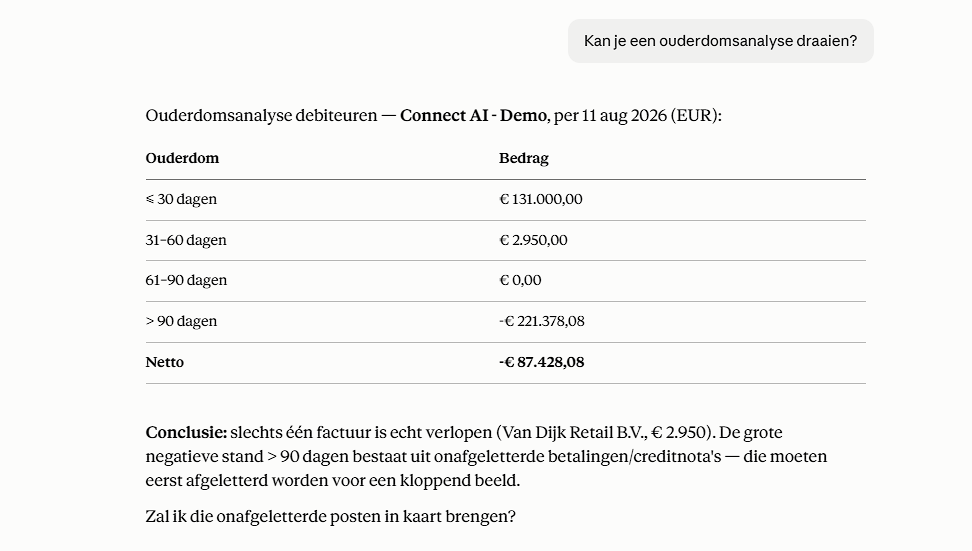
By way of illustration, here is a worked-out ageing analysis. You get the other analyses back in the same clear format: first the figures, then a short conclusion.
Asking follow-up questions on your analysis
An analysis is not an endpoint. You can ask follow-up questions on it right away, without rerunning the analysis. For example:
This is how you go from an analysis to a concrete next step. If that becomes a writing action, such as drafting a reminder, it comes ready as a draft that you approve first. Want to review an analysis more often without requesting it again? Then you turn it into a dashboard.