.png)








From quote to collection: automating the customer cycle
Zero manual data entry. Invoices within an hour. Payment insight in your CRM. This is the complete customer cycle, automated.
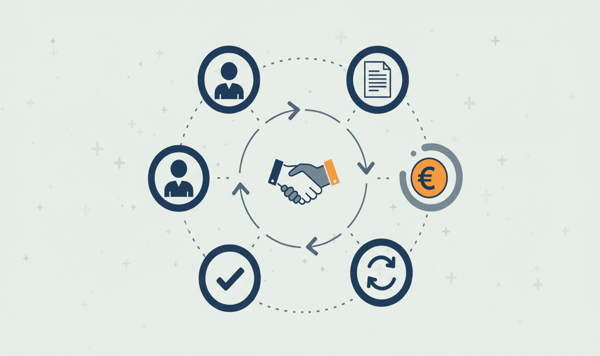
A lead fills in a form on your website. Three minutes later the company appears as a prospect in Exact Online. That same afternoon the customer signs a quote, and before your sales rep has finished his coffee, the sales invoice has been created. The customer pays after twelve days. Exact Online matches the payment, and a green checkmark automatically appears next to the deal in your CRM.
No manual data entry. No exports. No "let me just check whether that invoice has already been sent." That is what happens when you tackle automating the customer cycle as a whole, from the first point of contact to the final collection.
In this article we walk through all seven steps of that cycle. For each step we show what happens technically, where the data flows and what concrete benefit it gives you. We use HubSpot as a worked example, but the same logic applies to Salesforce and Pipedrive.
The seven steps of an automated customer cycle
1. Lead intake: CRM creates a prospect in Exact
A new contact in your CRM is the starting point. As soon as a lead is created in HubSpot (via form, import or manually) the connector syncs the company to Exact Online as a relation.
What happens: HubSpot Company data is converted into an Exact Online Account. Company name, VAT number and Chamber of Commerce number are carried over automatically. Is there already a relation with the same VAT number? Then it gets linked instead of a duplicate being created.
The result: your bookkeeping already knows the customer before a single euro has been invoiced. That saves searching later on and prevents typos in the address details.
2. Quote in CRM: deal with products
Your sales rep creates a deal in HubSpot with line items: products, quantities and prices. The product catalogue has already been synced from Exact Online earlier, so prices and article codes are always correct.
This is the point where many companies get stuck if they do not have a connector. Products are typed over manually, prices differ from the bookkeeping list and VAT codes are forgotten. With a connector the deal in HubSpot is immediately the source of truth for the invoice that follows.
3. Deal won: automatic sales invoice in Exact
The moment the deal status changes to "Closed Won" triggers the connector. All line items are converted into invoice lines in Exact Online, including amounts, VAT codes and article references.
Technically the connector translates HubSpot deal line items into Exact Online SalesInvoiceLines. For each line the amount, the VAT code and the article number are carried over. The invoice is created on the relation that already existed in step 1.
We wrote earlier about this specific mechanism in From quote to invoice: automatically from CRM to bookkeeping. The difference here is the context: it is not a standalone feature, but part of a chain.
4. Invoice sent: status back in CRM
As soon as the invoice is created and sent in Exact Online, the status goes back to HubSpot. Your sales rep sees in the deal that the invoice is on its way, without having to look in Exact.
This works through a custom property on the HubSpot deal. The connector polls the invoice status from Exact Online and updates it in HubSpot. "Draft", "Sent", "Open": it is right there.
5. Payment received: CRM updated
The customer pays. The bank processes the transaction, Exact Online matches the payment to the invoice (status goes from 20/open to 50/reconciled), and the connector passes that on to HubSpot.
The deal shows: "Paid." For your sales rep that is the signal that the circle is complete. No call to finance needed, no "could you just check whether...".
We described the technique behind payment statuses earlier in Payment status in your CRM: real-time insight for sales. Here you see how that fits into the bigger picture.
6. Payment overdue: automatic reminder and alert
But what if the customer does not pay? The connector detects invoices that are past the payment term. In Exact Online the status stays at 20 (open) while the due date has passed.
That triggers two things at once:
- Exact Online sends an automatic payment reminder (if you have set that up)
- HubSpot receives a status update ("Overdue") that triggers a workflow, for example a task for the account manager: "Call customer X, invoice 14 days past due"
That early intervention makes a big difference. The sooner you call, the greater the chance that it simply gets paid. Companies that implement this pattern see their collection success improve by 30 to 40%.
7. Customer pays after all: credit rating updated
After the reminder the customer pays. The cycle is complete. The payment history is now part of the customer profile in HubSpot. On the next deal your sales team sees right away whether this customer pays on time or not.
That sounds like a detail, but it changes sales conversations. An account manager who knows that a customer structurally pays late can make arrangements about it. Shorter payment terms, advance payment or a payment plan: you decide based on data, not on gut feeling.
What this delivers in numbers
Among companies that automate the full cycle we consistently see the same patterns:
| Component | Before | After |
|---|---|---|
| Manual data entry per invoice | 8-15 min | 0 min |
| Deal-to-invoice lead time | 3-5 working days | Within 1 hour |
| Payment insight for sales | Afterwards (via finance) | Real-time in CRM |
| Collection success after reminder | ~55% | ~80% (+40%) |
The biggest gain is not in a single step. It lies in the fact that the whole chain connects. Every manual intermediate step is a moment where errors arise, where delay creeps in and where information gets lost.
HubSpot, Salesforce or Pipedrive?
The logic is the same for all three CRM platforms. The differences are in the details:
HubSpot has the richest integration. Deals with line items, custom properties for invoice status, workflows that trigger on status changes and a product catalogue that syncs both ways. For SMEs that want to automate the full cycle this is the most complete option.
Salesforce offers the same possibilities on an enterprise scale. Opportunities with Products, custom fields and the power of Salesforce Flow for complex automations. Ideal if you are already in the Salesforce ecosystem.
Pipedrive targets sales teams that value simplicity. Deals, contacts and payment statuses sync. The Invoicing App Extension makes it extra interesting for teams that want to drive invoicing from Pipedrive.
From separate steps to a chain
The difference between "having a connector" and "automating the customer cycle" is the difference between separate puzzle pieces and a complete picture. In earlier articles we described the individual pieces: quotes to invoices, payment statuses in your CRM, converting deals automatically.
This article is the overview. All seven steps together form a chain in which data is entered exactly once, by your customer or your sales rep, and then flows automatically through your entire organisation.
No double entry. No "let me just check with finance." No invoices sitting around for three days. Just a process that works the way you expect it to work.
Want to try it yourself? View the HubSpot connector →
Prefer a different CRM? Salesforce connector → | Pipedrive connector →